Scout AI Assistant Now Connects to Adobe PDF Library Documentation via MCP
Our Scout AI Assistant just got a major upgrade: its underlying knowledge base is now accessible via the Model Context Protocol (MCP), letting developers query Datalogics documentation directly from their favorite AI coding tools.
What is MCP?
MCP is an open standard that allows AI assistants to connect to external knowledge sources mid-conversation. Think of it as a bridge — tools like Cursor or Claude can reach out and pull answers from a specific, curated data source without ever leaving the editor.
Here’s the basic flow:
- You’re working in your IDE and ask your AI assistant a question about the Adobe PDF Library, for example something like, “How do I flatten XFA form fields in .NET?”
- Your AI assistant recognizes it needs more than its training data to answer accurately.
- It sends a query to the Scout MCP server.
- The Scout server searches the Datalogics knowledge base including our documentation, API references, sample code, and more, and returns a grounded, cited answer.
- Your AI assistant delivers that answer inline, in context, with no interruption to your workflow.
The key insight behind MCP is separation of concerns: your AI assistant is good at reasoning and writing code; the MCP server is good at knowing your specific product inside and out. Together, they’re better than either one alone.
Where Scout MCP Works
The Scout MCP server is compatible with Cursor, VS Code, Claude Code, Claude Desktop, and ChatGPT Desktop — anywhere that supports MCP clients.
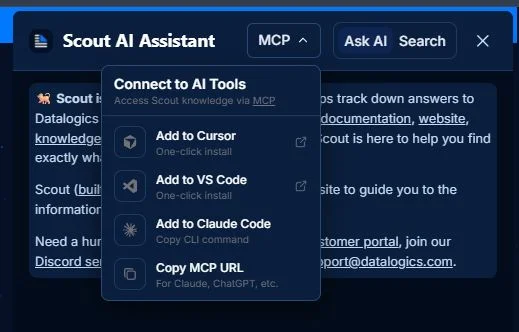
To get started, click the MCP button in the Scout widget header and choose your tool. Cursor and VS Code users get one-click installs, Claude Code users get a ready-to-run CLI command, and for any other MCP-compatible tool, there's a copyable URL to drop right in.
Here's a handy screenshot if you need it:
One important thing to note: the MCP server retrieves answers grounded in Datalogics' indexed documentation. Responses are accurate and cited, but scoped to what's been indexed — it won't fabricate answers or go off-script beyond those sources. That's a feature, not a limitation.
Why This Matters for Developers Building with PDF
If you’ve integrated the Adobe PDF Library into your application, you know there’s real depth to it. The SDK is built on the same core technology as Adobe Acrobat itself, which means it’s incredibly capable, and there’s a lot to learn. Common questions during development often sound like:
- “What’s the correct way to handle PDF/A-3 file attachments?”
- “How do I extract text from a scanned PDF using OCR in Java?”
- “What’s the difference between PDEImageJPXGetSMask() and the standard image extraction path?”
These aren’t questions a general-purpose AI can answer reliably from training data alone. They require accurate, up-to-date knowledge of our specific SDK, our API surface, and our sample code. That’s exactly what Scout’s MCP server provides.
TL;DR: Developers working with Datalogics PDF tools, APIs, and SDKs can now get precise, sourced answers right inside their editor — without breaking flow to hunt through docs or switch browser tabs.
Less context-switching, faster answers, better code.
How to Connect
Getting set up takes about a minute.
In Cursor or Windsurf:
Add Scout’s MCP endpoint in your MCP server settings: https://datalogics.mcp.kapa.ai
In Claude Desktop:
Add it as a custom integration from Settings → Integrations and paste the Scout MCP URL.
In Claude Code:
Run from the terminal:
claude mcp add --transport http scout https://datalogics.mcp.kapa.ai
Once connected, just ask your AI assistant questions and it will route the query through Scout automatically when relevant.
We’re excited to see what you build!