How PDF2IMG Handles Color Management: ICC Profiles, Rendering, and Color Accuracy
Convert a PDF to an image using most tools and you'll get a file that looks roughly right. Run that same conversion through a print production workflow, across multiple output devices, or at the scale of thousands of documents and "roughly right" stops being acceptable. Colors shift. CMYK values that looked correct on screen render differently on press. Two printers processing the same green, Cyan 31 / Magenta 0 / Yellow 80 / Black 5, can produce visibly different output because each device defines color independently.
This is the problem ICC color profiles were built to solve — and it's where PDF2IMG goes significantly deeper than basic conversion tools. PDF2IMG doesn't just rasterize your PDF; it manages the full color pipeline, from honoring calibrated color spaces embedded in the source document to writing accurate ICC profiles into the output file. Here's how it works.
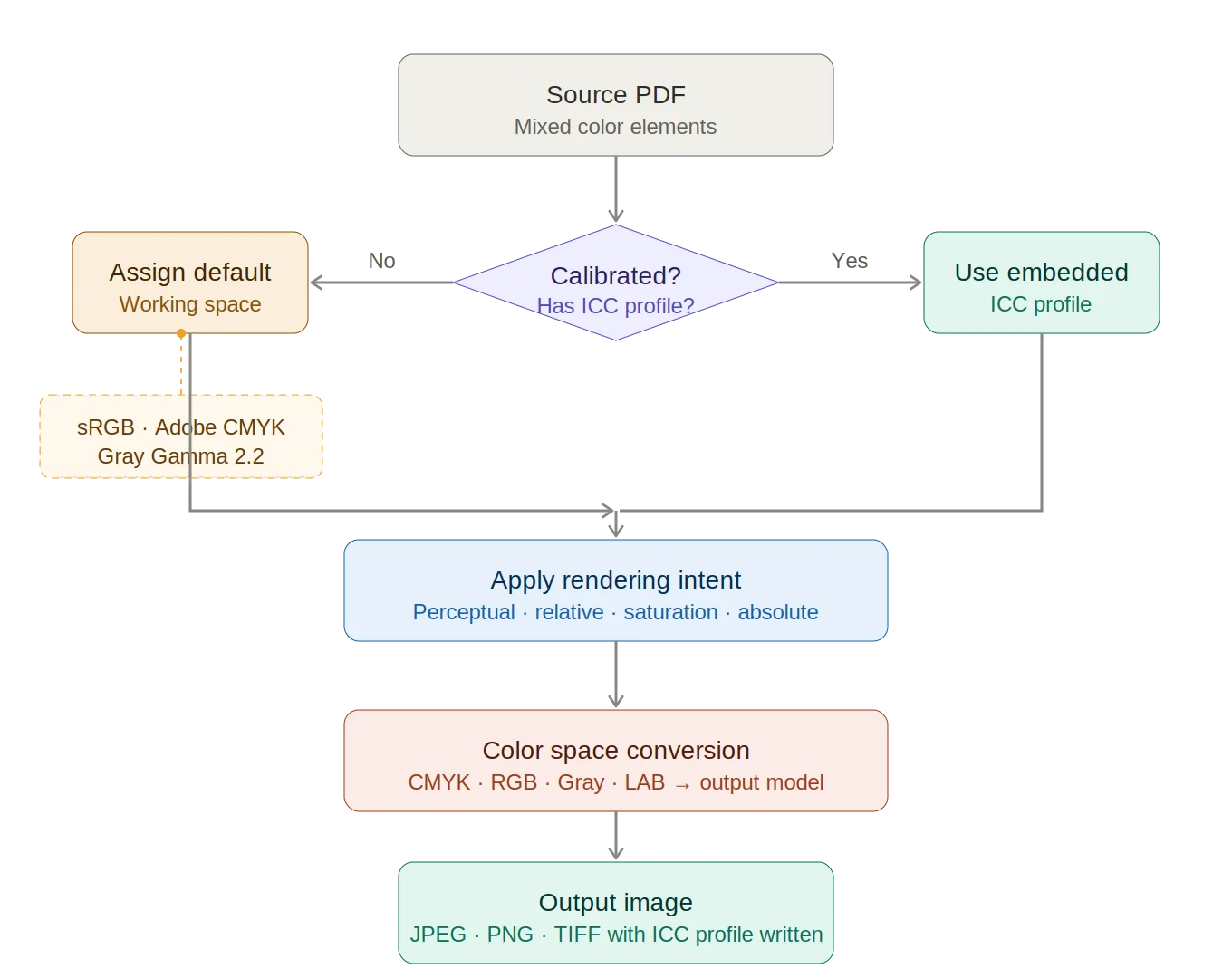
ICC Color Profile Pipeline
Color Management in PDFs
The lack of a standard for managing color became a problem with the complex technology that started to appear in the mid-20th century. Multiple manufacturers introduced a wide variety of input devices, including scanners, printers, digital cameras, and mobile devices.
These devices needed to communicate with an equally wide variety of output devices, such as monitors, presses, laser, ink jet, dot-matrix printers, and copy machines. This created a vast number of possible color conversions from one hardware device to another.
In response, color management was introduced, using color profiles. The International Color Consortium (ICC) developed a color specification in 1993 that works across all operating systems and software packages and applies regardless of the hardware involved.
All color profiles are based on this ICC specification. A color profile is a table that specifies standard values for a range of colors, and that works as a translation matrix between devices. Any two devices involved in a transaction that requires content to be printed or displayed will share a color profile and convert their internal color values to match the standard provided in that profile.
A variety of color profiles have been defined, presented in
the form of .icc files. Some of these profiles are specific to hardware
devices, and define what a camera can detect, or a printer print, or a monitor
display. Others are based on software and thus can be used across many kinds of
devices.
Read PDF to Image Conversion with PDF2IMG: Developer Guide
For example, USWebCoatedSWOP is a standard CMYK color profile, commonly used with Adobe Systems software products like PhotoShop and InDesign. The standard RGB color space, sRGB, was developed by Microsoft and Hewlett Packard to describe colors available on most monitors and other displays.
This color space is also commonly used for web graphics. And the Adobe RGB color profile (AdobeRGB1998.icc) was designed by Adobe Systems to hold all of the colors that are likely to be available on any color CMYK printer. It is considerably larger than standard RGB.
A single PDF document can support a wide variety of elements using different color models. Often a PDF file is produced and saved with elements in the DeviceRGB, DeviceCMYK and DeviceGray spaces that have an associated ICC profile.
An element in a PDF that has an associated profile is considered calibrated. Elements that do not have embedded profiles are considered un-calibrated. PDF processing software will often assign default profiles (referred to as working spaces) to un-calibrated elements. Graphics files, however, such as PNG, TIF, or JPEG, can only hold a single color profile.
When
PDF2IMG rasterizes a page from a PDF document to create a graphic file, it will
assign default profiles for un-calibrated elements in the PDF, or you can
specify the input and output color profiles you want to use from a stream or
file. When PDF2IMG initializes, it identifies the color profiles present in the
subject PDF document, and that are available on the host machine.
Conversions with ICC Color Profiles
PDF2IMG will honor calibrated colorspaces in PDF files, if
output color management is in effect. The product will also write target ICC
profiles to the TIF, JPEG, PNG, or BMP output files. Color management can be
suppressed using either the Color Management Module nocmm command line call or
the pdf2img_set_colormanagement API call.
For non-calibrated spaces, PDF2IMG will use the defaults provided by the Adobe PDF Library for conversions, depending on the colorspace.
Download a free trial of PDF2IMG to ensure accurate color in your PDF to image conversions.