PDF2IMG vs. Ghostscript vs. ImageMagick vs. Poppler: Developer Comparison
If you are evaluating PDF-to-image tools for a production workflow, this post covers what you actually need to know, including where open-source options are genuinely good enough, and where they are not.
If you are evaluating PDF-to-image tools for a production workflow, you have probably already looked at Ghostscript, ImageMagick, and Poppler. They are free, widely documented, and available on every major platform. For simple PDFs, they work. The question is what happens when your documents are not simple, and what the right tool is when the output actually has to be correct.
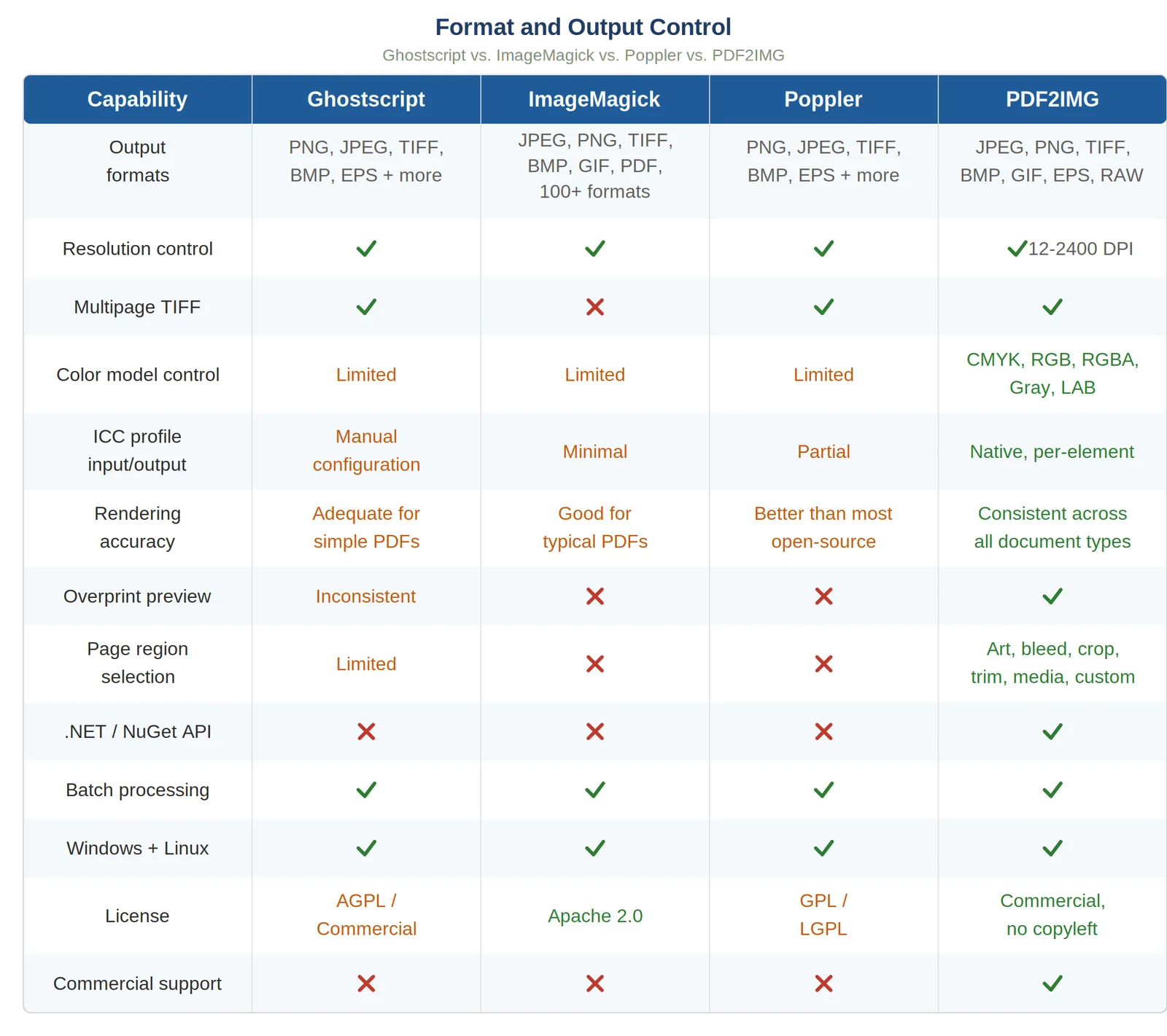
This post is a direct, fair comparison of all four tools across the dimensions that matter most for developers making this decision: rendering accuracy, color management, format support, licensing, and support. No marketing hedging, just what each tool does well and where it falls short.
The Short Version
If your PDFs are straightforward and color consistency is not a hard requirement, any of the free tools will probably get you there. If you are processing complex documents at scale, print-ready PDFs, CMYK files, documents with embedded ICC profiles, or anything where output quality must be reliable and predictable, you will eventually hit the ceiling on Ghostscript, ImageMagick, and Poppler. PDF2IMG is purpose-built for the cases where those tools fail.
How Each Tool Approaches PDF Rendering
Understanding the architectural differences explains most of the behavioral ones.
Ghostscript
Ghostscript is a PostScript interpreter that has been in active development since 1988. It was built primarily around PostScript, with PDF support layered on top. That lineage matters: Ghostscript processes PDF through a PostScript-like pipeline, which means it handles most documents well but can struggle with features that are native to modern PDF but have no PostScript equivalent, particularly transparency, overprint, and certain blend modes. It is also the rendering backend that ImageMagick delegates to for PDF conversion, which means ImageMagick inherits Ghostscript's limitations along with an extra processing step.
ImageMagick
ImageMagick is an image manipulation toolkit, not a PDF renderer. When you use it to convert a PDF, it calls Ghostscript to do the actual rendering and then processes the result. Color transformations can happen twice, once during PDF rendering and once during ImageMagick processing, which can introduce compounding color shifts that are difficult to diagnose. For simple documents this is rarely a problem. For color-critical workflows it is a real risk.
Poppler
Poppler is an open-source PDF rendering library used by many Linux PDF viewers and command-line tools including pdftoppm and pdfimages. It is lightweight, reasonably fast, and performs well on text-heavy PDFs in standard workflows. It does not implement the full Adobe PDF specification, however. Advanced color management, certain transparency models, and complex blending modes are not handled correctly in all cases, making it insufficient for prepress, print, or color-critical workflows.
PDF2IMG
PDF2IMG is built on the Adobe PDF Library, the same rendering engine that powers Acrobat and Creative Cloud. Unlike the open-source tools, it was designed from the ground up for PDF. Transparency, overprint, CMYK, embedded ICC profiles, and complex font handling are all handled natively rather than approximated. The difference shows most on the documents where the other tools struggle.
Color Management
This is where the tools diverge most significantly, and where tool choice has the most visible impact on output quality.
Ghostscript
Ghostscript has color management capabilities but they require manual configuration to use correctly. Default behavior works adequately for screen output. For print workflows requiring accurate CMYK rendering, ICC profile handling, or calibrated color spaces, you need to configure device profiles, rendering intents, and color space assignments explicitly. Documentation on doing this correctly is sparse and inconsistent.
ImageMagick
ImageMagick inherits Ghostscript's color handling for the PDF rendering step and adds its own layer on top. ICC profiles are often stripped or incorrectly applied. CMYK conversions can produce visible color shifts. For anything beyond casual screen-quality output, the color pipeline is not reliable.
Poppler
Poppler has minimal color management support. CMYK rendering is incomplete. It is not a suitable component in any color-critical workflow.
PDF2IMG
PDF2IMG treats color management as a core feature. Embedded ICC profiles in source PDFs are read and applied correctly during rasterization, not stripped. Uncalibrated color elements get sensible defaults: Adobe 1998 RGB for RGB content, Adobe Reader CMYK for CMYK, and Gray Gamma 2.2 for grayscale. CMYK-to-RGB conversions use profile-aware transforms that preserve the intent of the original color values. Rendering intents (perceptual, relative colorimetric, saturation, absolute) are configurable per conversion. For a CMYK PDF destined for print, the output looks the way the document was designed to look.
Rendering Accuracy on Complex PDFs
For straightforward documents, all four tools produce acceptable results. The differences emerge when documents use features that stress the rendering engine.
Transparency and overprint are the most common failure points for Ghostscript. PDFs with stacked transparent objects require a flattening pass that Ghostscript handles through its PostScript pipeline, which can produce incorrect output on complex transparency stacks. Overprint, where inks are intentionally layered in print production, is another area where Ghostscript output can diverge from what Acrobat renders.
Poppler handles typical office PDFs and web-ready documents well. It falls apart on advanced transparency models and print-ready PDFs. For document management systems processing varied incoming files, this means unpredictable output quality depending on the source.
Font handling is a consistent challenge across all three open-source tools. PDFs referencing fonts that were not embedded require the renderer to find or substitute those fonts. Ghostscript, ImageMagick, and Poppler search system font directories and substitute when fonts are missing, with varying degrees of accuracy depending on the platform. PDF2IMG searches for fonts in the same locations as Adobe products, supports custom font directory lists, and ships with its own fallback font resources, providing consistent results even when fonts are not embedded.
PDF2IMG produces consistent, accurate output across document types including complex prepress PDFs, CMYK files, and font-heavy documents, because it is built on the same Adobe rendering technology that sets the standard for how PDFs are supposed to look.
Batch Processing and Performance
All four tools support batch processing and have well-documented workflows for processing multiple files. The differences at scale come down to reliability and how each tool handles edge cases in a diverse document set.
For high-throughput pipelines, PDF2IMG is tested against enterprise-scale document sets and is designed for production use. It supports concurrent execution, making it straightforward to parallelize across multiple worker processes. The rendering engine does not degrade in quality or consistency on the documents that would cause Ghostscript or Poppler to produce incorrect output, which means less manual intervention and fewer downstream errors to track down.
Licensing
Licensing is frequently the dimension that ends the open-source evaluation for commercial teams, and it is worth being direct about.
Ghostscript is dual-licensed under AGPL for the open-source version and a separate commercial license from Artifex. The AGPL is a strong copyleft license: any software that incorporates AGPL-licensed code and is distributed to users or made available over a network must itself be released under the AGPL. For a commercial product or a SaaS application, this means that using the free version of Ghostscript could require open-sourcing your entire application. The commercial license resolves this but adds cost and complexity that eliminates the free advantage.
Poppler is GPL and LGPL licensed depending on the component. Redistribution requires open-source compliance. For products being distributed to customers, this requires a licensing analysis before Poppler can be safely included.
ImageMagick is Apache 2.0 licensed, which is permissive and allows commercial use and redistribution without copyleft obligations. However, using ImageMagick for PDF conversion means depending on Ghostscript under the hood, which brings the AGPL question back in for PDF-specific workflows.
PDF2IMG is a commercial product with clear licensing terms. There are no copyleft obligations, no source disclosure requirements, and redistribution options are explicitly available. For any team building a product that will be sold, licensed, or distributed, that licensing clarity is a meaningful operational advantage.
Enterprise Support
Ghostscript, ImageMagick, and Poppler all rely on community support. There is no enterprise SLA, no dedicated engineering channel, and no guaranteed response time when a production system encounters an edge case.
PDF2IMG includes commercial support from Datalogics, with direct access to PDF engineering expertise. For production systems where a rendering failure needs resolution on a timeline that a GitHub issue thread cannot guarantee, that support model matters.
When to Use Each Tool
Use Ghostscript, ImageMagick, or Poppler when your PDFs are straightforward, your budget is zero, you have engineering resources to manage edge cases manually, and color accuracy is not a hard requirement. All three are capable tools for internal tooling, non-commercial projects, and simple conversion needs.
Use PDF2IMG when you are processing complex PDFs at scale, color fidelity is required, you need .NET integration via NuGet, you need commercial licensing with redistribution rights, or you need guaranteed support backed by an SLA. It is the right call for any production pipeline where output quality must be reliable and consistent across a diverse document set.
Start Your Evaluation
Start your PDF2IMG free trial today. Download the installer, run your most complex PDFs through it, and compare the output to what you are getting from your current tool. For teams that have been managing edge cases and color issues with open-source workarounds, the trial process typically surfaces the quality difference in under an hour.
Start your free trial of PDF2IMG
Install via NuGet