PDF Optimizer vs. Ghostscript vs. Adobe Acrobat vs. iLovePDF: Comparing PDF Compression Tools
If you are evaluating PDF compression tools for a production workflow, you are probably looking at some combination of these four options. They are the most commonly discussed tools in developer forums, and each has genuine strengths alongside real limitations. This post compares them directly, without promotional framing, so you can make a clear decision for your use case.
What This Comparison Covers
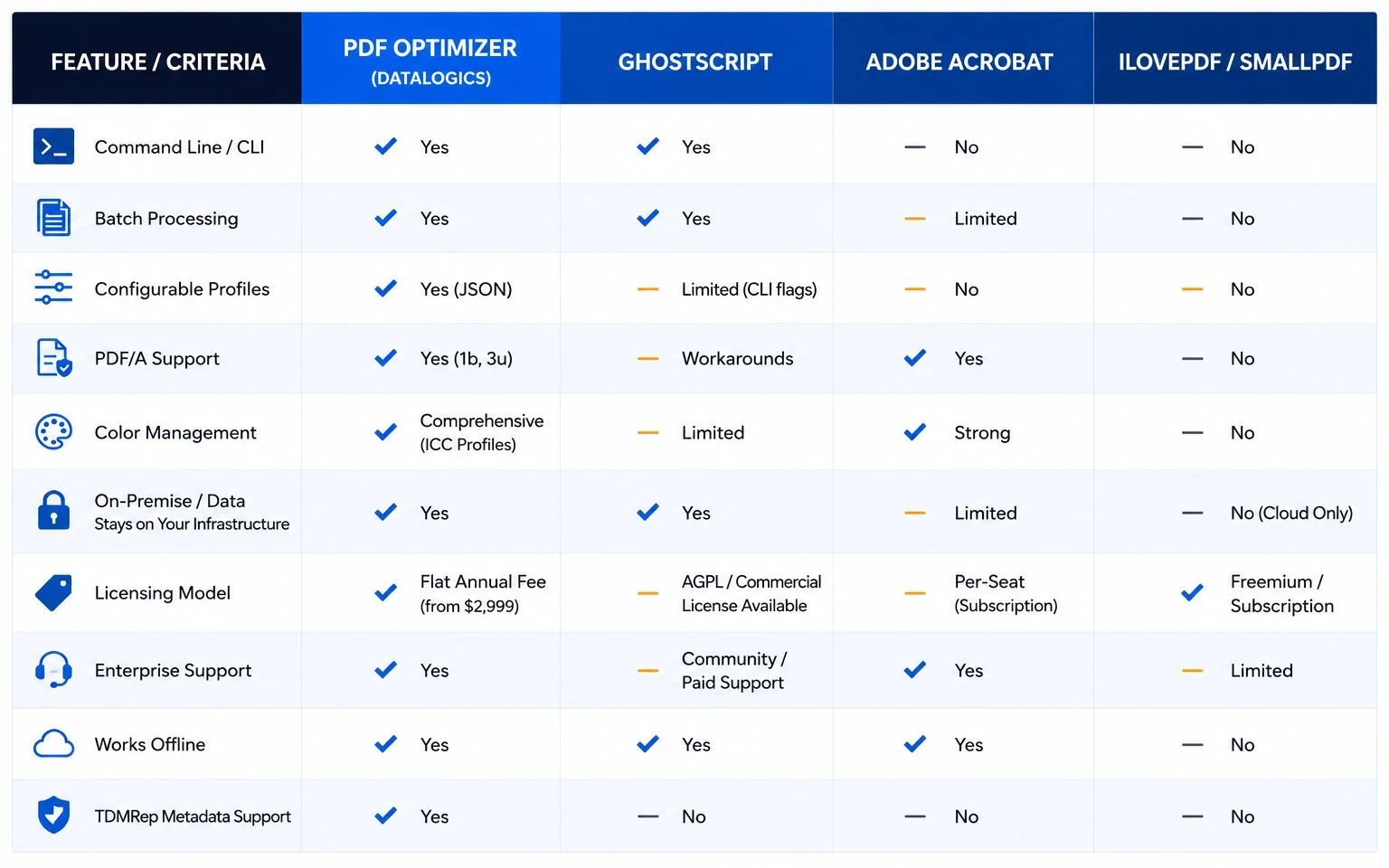
The evaluation criteria that matter most for enterprise and developer workflows are: compression quality, batch and command-line capability, PDF/A and compliance conversion support, color management, licensing model, enterprise support, and data handling. Each tool is assessed on all of these dimensions.
Ghostscript
Ghostscript is a free, open-source PostScript and PDF interpreter that has been used for PDF processing for decades. Its primary advantage is cost: it is free to use and widely available on Linux, Windows, and macOS. For developers who need basic PDF compression and have flexibility on output quality, Ghostscript is a functional starting point.
Its limitations in enterprise contexts are significant, however. Ghostscript compression output is inconsistent across document types, and the compression quality at equivalent settings is often lower than commercial alternatives. The configuration model requires passing command-line flags, not a structured profile file, which makes it difficult to define and reuse consistent settings across large document batches.
The most important enterprise concern with Ghostscript is licensing. Ghostscript is licensed under the AGPL, which requires that any application distributing or linking to Ghostscript release its own source code under the same license. Organizations building proprietary software pipelines that incorporate Ghostscript may be exposing themselves to licensing risk. A commercial Ghostscript license from Artifex is available, but adds cost.
Ghostscript does not have native PDF/A output support. Producing PDF/A output from Ghostscript requires workarounds and produces inconsistent results that often fail PDF/A validators. Color management is limited compared to purpose-built PDF optimization tools.
Adobe Acrobat
Adobe Acrobat is the most widely recognized PDF tool in the market, and it has a legitimate place in individual and small team workflows. For desktop use, it is capable and familiar. For enterprise automation, it has structural limitations that make it a poor fit.
Acrobat was not designed for server-side automation or headless batch processing. The software requires a GUI environment to run, which creates significant complications when deploying on cloud infrastructure or running in container-based pipelines. While Adobe has released some APIs for certain PDF operations, there is no native CLI tool equivalent to running Acrobat in a production backend.
Acrobat licensing is per-seat, which means costs scale with the number of workstations or virtual machines running the software. For workflows processing millions of documents across distributed infrastructure, the licensing model becomes prohibitively expensive. Acrobat does support PDF/A output and has solid color management capabilities, but these strengths are only accessible in the context of its desktop interface or limited API surface.
iLovePDF and Smallpdf
Web-based compression services like iLovePDF and Smallpdf have a clear use case: one-off document compression for individuals. They are easy to use, free for low volumes, and require no software installation. For a developer or operations team building a production pipeline, they are not a viable option.
The core problem is that both services are cloud-based, meaning documents must be uploaded to a third-party server for processing. For organizations handling confidential documents, legal files, financial records, or any content governed by data privacy regulations, this creates an unacceptable security and compliance exposure. Neither service offers a deployment model that keeps documents within your own infrastructure.
Additionally, neither service offers the configuration depth required for enterprise optimization workflows. There are no JSON profiles, no granular control over image downsampling per color mode, no PDF/A conversion, and no CLI integration. They process documents through a fixed algorithm, not a customizable one.
PDF Optimizer
PDF Optimizer is a command-line PDF processing tool designed for automated and server-side workflows. Compared with desktop tools and web-based services, it emphasizes configurable processing profiles, batch consistency, and deployment flexibility for larger-scale document environments.
PDF Optimizer uses JSON-based profiles to define processing rules. Teams can configure settings such as image downsampling, compression methods, color conversions, object removal, linearization, and font handling, then apply those settings consistently across large document volumes.
You define which image types to downsample, at what resolution, with which compression algorithm and quality value. You specify color space conversion targets. You select which object types to remove. You enable or disable linearization, transparency flattening, and font subsetting. All settings are optional and off by default, which means you can be precisely surgical about what changes and what stays untouched.
PDF Optimizer includes support for PDF/A-1b and PDF/A-3u conversion alongside optimization operations, which may simplify workflows for teams that otherwise use separate tools for compression and compliance conversion.
Color management includes a comprehensive set of ICC profiles covering sRGB, CMYK variants, Lab D50, dot-gain profiles for offset printing, and Apple RGB for Mac-originated documents.
It runs on Windows 64-bit and Linux 64-bit, integrates naturally into CI/CD pipelines, batch scripts, and document processing queues, and generates detailed output reports for each processed file. Licensing is a flat annual fee starting at $2,999 per year for internal use, with OEM licensing available for redistribution scenarios, which avoids the per-seat scaling problem that affects Acrobat.
PDF Optimizer also includes PDF Checker at no additional cost. PDF Checker validates documents before they enter the optimization pipeline, identifying structural errors, unembedded fonts, and invalid color spaces that would cause problems downstream.
The newest capability in PDF Optimizer is TDMRep metadata support: embedding W3C Text and Data Mining Reservation Protocol permissions into PDF XMP metadata during the optimization pass. This is an emerging capability in PDF processing workflows and is especially relevant for organizations publishing PDFs that may be accessed by AI training systems.
Comparing Features
The Bottom Line
Different tools fit different environments:
- Ghostscript: Often a practical option for developers prioritizing flexibility and low upfront cost, particularly when licensing considerations align with the project.
- Adobe Acrobat: Commonly used for desktop-based workflows and smaller teams needing interactive document editing.
- iLovePDF/Smallpdf: Useful for occasional, low-volume document tasks where deployment and customization are not primary concerns.
- PDF Optimizer: Better aligned with workflows that prioritize automated processing, profile-based configuration, compliance conversion, and on-premises deployment.
Get a free trial of PDF Optimizer and run your own documents through the trial and compare the output against the products listed above to see which works best for your workflow.